USFans · English
USFans Order Status: Find the Stage That Needs Attention
Identify whether a USFans order question concerns payment, purchasing, domestic delivery, warehousing or an international parcel before taking action.
On this page
When a USFans order appears stuck, start with the individual item or parcel rather than the whole shopping list. A payment record, a seller's domestic shipment and an international tracking event describe different stages. Comparing the wrong records can make a normal handover look like a missing order.
Open the relevant record and note its latest message, timestamp and reference. The categories below are a way to interpret the process, not a promise that every screen uses these exact labels.
Identify which record answers your question
| Your question | Record to inspect first |
|---|---|
| Did the payment go through? | Payment activity and the matching order |
| Has the item been purchased from the seller? | Item order and any purchasing message |
| Has the seller sent it to the warehouse? | Domestic shipment associated with that item |
| Is the correct item recorded at the warehouse? | Warehouse item details and available photos |
| Have my selected items been sent internationally? | Parcel record, dispatch information and its tracking reference |
Keep item and parcel identifiers separate. A parcel may contain several items, while one item order may still be waiting for an action that does not affect the others.
Payment recorded, but purchasing is unclear
Read any message attached to the item. It may ask you to clarify an option or respond to a purchasing issue; do not assume a payment receipt answers that request. Equally, do not invent a stock problem merely because the status has not changed.
If the payment provider and order disagree about whether payment completed, follow the payment-failure guide. Creating another order before reconciling the first can make the situation harder to explain. For an item with no clear next action, ask support what is preventing progress and include the exact reference.
Seller dispatch is not international dispatch
A seller's shipment to the USFans warehouse is different from the later parcel sent to your address. Check which journey the tracking number describes. A delivery event for the domestic leg does not establish that your international parcel has been delivered.
If the domestic carrier shows delivery but the warehouse item record has not caught up, preserve both records and their times. Ask for reconciliation if needed. A single mismatch does not establish loss, inspection completion or a platform-wide problem.
Waiting for the seller to ship
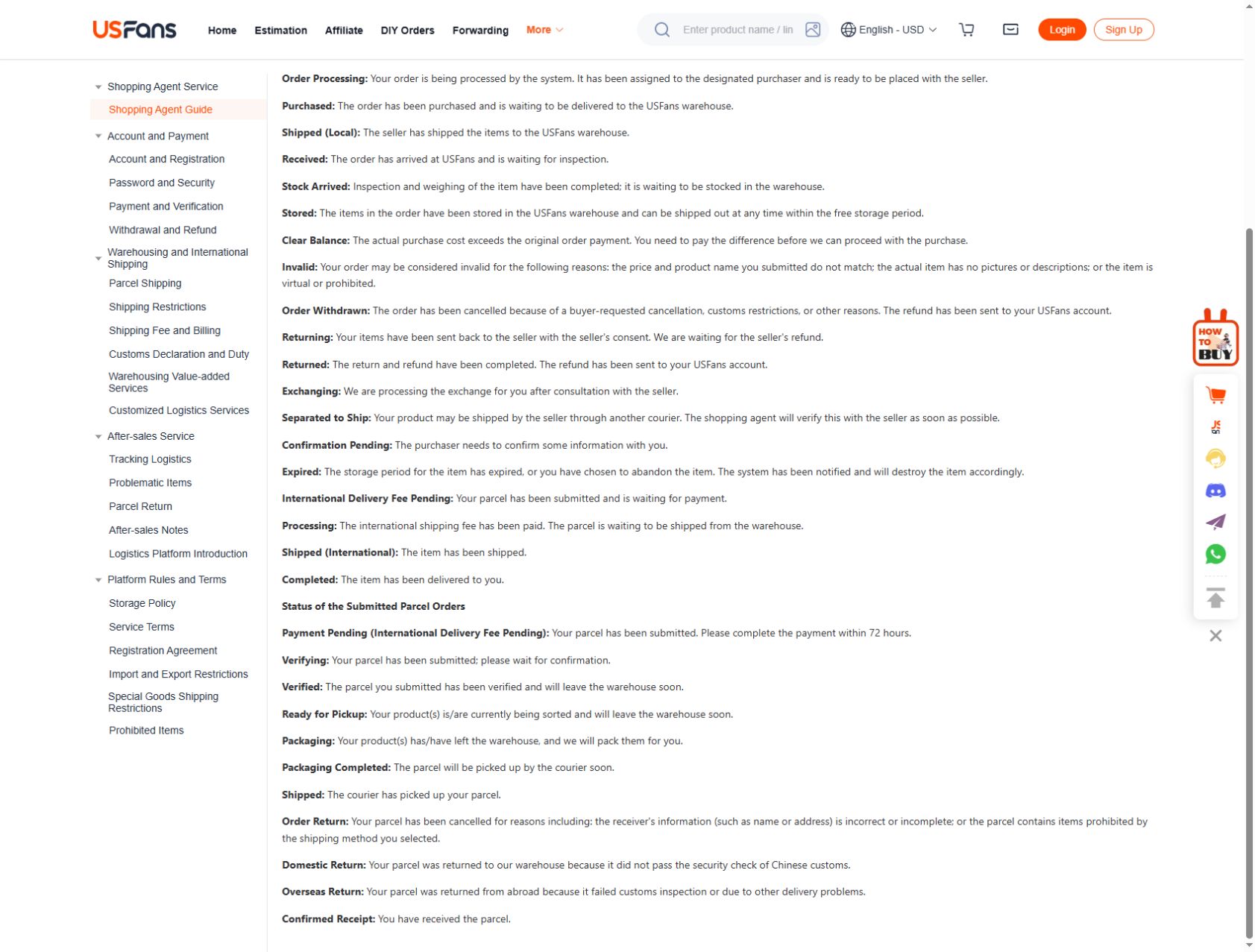
If you are looking for help with USFans urging seller to ship, first establish whether the purchase has reached the seller or whether an earlier purchasing action is still outstanding. The USFans status explanation distinguishes Purchased, when warehouse delivery is still awaited, from Shipped (Local), when the seller has dispatched the goods to the warehouse. Neither stage describes the later international parcel.
Ask about the selected item rather than the entire haul: “Has the seller confirmed dispatch for this option, and is there a domestic tracking reference? If it has not shipped, what action is available for this order?” A request to chase dispatch does not itself establish that the seller has shipped. Keep any reply with the order record and compare it with the next actual shipment update.
Before changing an option or requesting cancellation, confirm what is possible at the current stage. Repeated reminders cannot establish stock availability, a dispatch date or cancellation eligibility.
Warehouse arrival needs an item check
Match the colour, size and quantity before planning dispatch. For several similar items, inspect each record rather than using one photo set to approve them all. A photograph being available is not the same as every concern being resolved.
In the USFans status explanation checked on 30 September 2026, arrival before inspection is distinct from inspection and weighing before storage, followed by the stored stage. Use those transitions to make the question specific: receipt, checking and storage are not three names for the same completed action.
If a detail is unclear, specify the view or measurement that would answer it. If the item may need returning, check the relevant conditions promptly. The warehouse guide separates storage, inspection and parcel preparation; the returns guide addresses a different decision from simply waiting for another status update.
A parcel record is not a carrier scan
Check whether the parcel details show preparation, dispatch or an actual tracking event. A reference number by itself does not prove the carrier has physically received the shipment. Use the latest information attached to that parcel instead of applying a seller's earlier tracking history to it.
The same USFans explanation places Packaging Completed before courier collection and Shipped after pickup. For returns, Returning means the seller refund is still awaited; Returned refers to credit to the USFans account. That last status does not establish a completed withdrawal to your bank.
Once you are dealing with international movement, continue with the tracking guide. Do not use the age of the original product order as the entire transit time: time spent purchasing and waiting in the warehouse is a different part of the journey.
Ask a question support can answer
Send a short message through the authenticated support channel containing:
- The relevant item or parcel reference.
- Its latest displayed state and timestamp.
- The conflicting record, if there is one.
- Any requested action you have already completed.
- A direct question about the next action or missing handover.
For example: “The domestic tracking record shows delivery, but this item's warehouse record has not updated. Can you confirm whether it has been received and whether you need anything from me?” This is a question template, not a claim about a particular order.
Crop unrelated information from screenshots and keep personal addresses, financial details and credentials out of public posts. The support guide explains how to keep one case coherent.
Avoid changes that do not address the delay
Repeatedly replacing an item, changing its option or creating another purchase does not explain what happened to the original. First settle the state of the existing order. If support confirms that a replacement is appropriate, inspect the new candidate and its dimensions before choosing it.
Inspect the T-shirt candidate on OG
The USFans buying guide can help you follow the complete sequence when you are ready for another purchase.
How many days without an update means the order is lost?
There is no single number that establishes that conclusion across purchasing, warehouse handling and transport. Check the stage-specific information and ask about an unexplained gap rather than treating elapsed time alone as proof.
Why did one item update before another?
Compare their sellers, references and current stages. Do not assume they share a dispatch or handling event just because you paid for them near the same time.
Should I cancel because the tracking number has no scan?
First establish what the number represents and whether the parcel has been handed over. Ask about the actual options for the current stage instead of assuming cancellation remains available.
Home ·
Compare the current product details and available options before adding this item to your shortlist.
View the product on OG Spreadsheet