USFans · English
USFans Support: Explain the Problem and Ask for a Clear Next Step
Prepare a focused USFans support request for an item, shipping estimate or tracking question while protecting private account and transaction information.
On this page
Before contacting USFans customer service, identify whether your question concerns a product order, a warehouse check, a payment or a parcel. That distinction determines which information is useful. Sending every screenshot from your account can obscure the problem and expose details that are not needed.
Open support through a known account or platform entry point. Do not trust an unsolicited direct message simply because the sender uses a familiar logo or knows that you are waiting for an order. Never provide your password or verification codes to someone offering to fix a purchase.
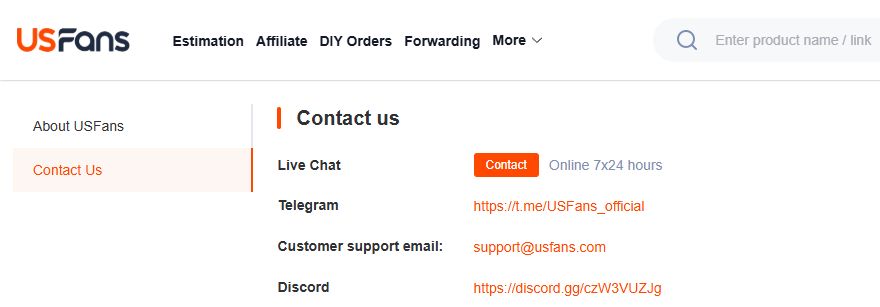
The USFans Contact Us page checked on 30 September 2026 displayed Live Chat, the address support@usfans.com, and Telegram and Discord entries. Confirm those details from the platform's contact page before using a channel. A logo or name in an incoming message is not the same as a contact reached from that page, and the listed channels do not promise an immediate response.
Start with one issue and one requested outcome
A useful request explains what you expected, what you observed and what you want clarified. Separate facts from guesses. “The photo shows a different colour from my selected option” is more precise than accusing someone of replacing the item when you do not know what happened.
Keep the request focused. If a parcel has no new tracking event, ask about that event sequence rather than adding unrelated questions about a future purchase. If several issues concern the same order, number them clearly so the reply can address each one.
Choose the information that matches the question
| Question | Useful information to provide privately |
|---|---|
| Wrong option or visible damage | Order identifier, selected option and relevant photo |
| Unclear measurement | Item, exact dimension and measurement endpoints |
| Shipping-price difference | Previous inputs, current parcel details and the charge in question |
| Tracking uncertainty | Parcel identifier, service and latest event with timestamp |
| Unclear payment result | Relevant transaction reference and order status, without credentials |
Include identifiers only through the appropriate private channel. Remove unrelated account details from attachments. Keep the original files privately if you need them later, but share the smallest useful set.
Example: ask about a product mismatch
You might write:
> I selected the black option for this item. The attached order photo appears to show another colour. Please confirm whether the photo matches my selected item and what options are available if it does not.
This asks a question that can be investigated without claiming an explanation you have not established. Add the order identifier privately and make sure the attachment shows the relevant area. The QC photo guide helps you identify whether another angle would resolve the uncertainty.
If a photo is inconclusive, say so. Do not turn a shadow or blurred detail into a definite defect merely to make the message sound stronger.
Example: ask about a shipping estimate
A clear request could say:
> My earlier estimate used these parcel inputs. The current amount is different. Please explain which weight, dimensions, service or additional charge accounts for the change.
Attach only the relevant estimate and current details, with private information handled appropriately. The shipping calculator guide explains which inputs need to match. A screenshot of another buyer's total is not a substitute for the inputs of your own parcel.
Example: ask about a tracking gap
State the last visible event and when it appeared, then ask what it means for the selected service. Avoid inventing a delivery deadline or treating a missing update as proof of loss.
The tracking guide shows how to compare events before contacting support. If two screens conflict, include both event descriptions and their update times so the difference is clear.
Keep the conversation together
Where possible, follow up in the same case so the earlier details remain available. Record what was requested, what was answered and any next action given to you. If a reply does not address the question, point to the unanswered part rather than restarting the entire story.
Do not infer a guaranteed reply time from another person's experience. Check any response guidance shown in your current support channel. If a matter has a relevant deadline, identify that deadline accurately in the message and ask how to proceed; do not assume the act of sending a message changes it.
Check the proposed action before agreeing
Read what a suggested resolution actually involves. Is support asking for another photo, a confirmation, a change of option or something else? Ask about anything you do not understand before taking the next step. A request submitted is not the same as a completed outcome.
If your question concerns an outfit set, compare the selected option and included pieces with the listing before describing a missing or different component. You can inspect this grey Essentials set on OG as a product-information example, but do not assume its contents match your order. That product page does not provide USFans account support or resolve a transaction. Do not place a replacement order simply because a support question remains unanswered.
Common contact questions
Can a community member handle my order for me?
They may offer general suggestions, but do not share credentials or private account access. Use the appropriate account channel for an action involving your transaction.
Should I send the same message everywhere?
Repeated messages across separate conversations can make the history harder to follow. Keep one clear record where possible and use the channel appropriate to the issue.
What if I only need to understand the buying process?
Start with the USFans ordering guide. If you still need help, ask about the specific step rather than sending private order information for a general question.
Home ·
Compare the current product details and available options before adding this item to your shortlist.
View the product on OG Spreadsheet