USFans · English
USFans Sheet: Build a Shortlist You Can Actually Use
Organise a personal USFans shortlist with clear variants, useful comparisons and unresolved questions while keeping candidates separate from orders.
On this page
A personal USFans sheet should help you choose, not merely accumulate links. Start with the items you might genuinely wear or use, then keep enough information to compare them without reopening every page from memory.
You can use a simple table or notes list. The important part is distinguishing a saved candidate from an item you have selected, purchased or received. A row in your shortlist is not an order record.
Give each entry one identifiable purpose
Save the specific item and the role it would fill: a light jacket for layering, a shirt with a shorter hem or a bag with suitable dimensions. A broad label such as “nice clothes” makes it hard to compare alternatives or decide what to remove.
Keep the product link, model description and selected colour or size together. If you are considering two variants, make the distinction visible rather than allowing one note to describe both. The spreadsheet links guide explains how to avoid losing the selected option when returning to a destination.
Use fields that answer a buying question
| Field | Why it helps |
|---|---|
| Item and destination | Lets you reopen the intended candidate |
| Selected option | Keeps colour, size and bundle choice clear |
| Wardrobe role | Explains why the item belongs on the shortlist |
| Key dimensions | Supports comparison with something you already own |
| Observed amount and currency | Records what was shown for that option and quantity |
| Unresolved question | Identifies what you still need before choosing |
Do not fill every cell with a guess just to make the table look complete. If the sleeve measurement is the deciding factor, that is the question to clarify. A blank factual field is preferable to a made-up dimension.
Compare alternatives within the same role
Put competing candidates beside one another. If two sweaters would serve the same purpose, compare their stated dimensions and the design features you care about. Do not compare one item's best photograph with another item's price alone.
For example, a hoodie candidate might interest you because you want a casual layer with a hood. That preference gives you concrete checks: hood shape, garment length and room under your usual jacket. It does not establish warmth or fabric feel from the image.
Examine the garment options on OG
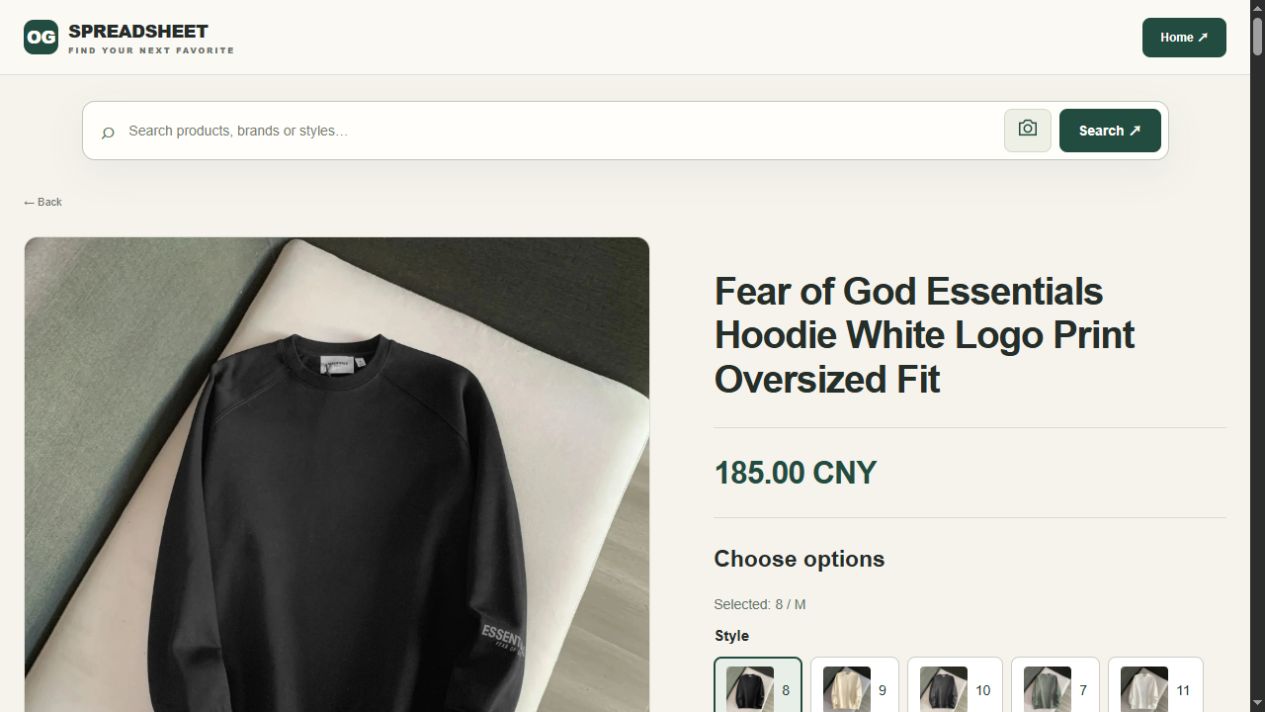
Record the option that explains the picture
For this destination, the 1 October 2026 view of Style 8 / M showed a black crewneck and 185.00 CNY, although the heading said hoodie. A useful row therefore keeps the style number, size, image and date together. Copying only the heading would lose the very distinction that determines whether the garment fits your layering plan.
The hoodies and sweaters guide develops the garment comparison. Keep the candidate separate from any claim about an item you have actually worn.
Reduce duplicates without losing useful differences
Two entries may lead to the same offer even if their titles differ. Compare the destination and option before counting them as different choices. If one entry contains a useful measurement note, preserve that note when consolidating your own list.
Conversely, do not merge genuinely different variants just because their thumbnails look similar. A distinct size chart or included bundle can change the decision. Write a short explanation of the difference so you do not have to rediscover it later.
Keep cost planning separate from payment confirmation
An observed product amount is not the full delivered cost. Keep item selection separate from the eventual parcel calculation and from actual transaction records. If the price is in a different currency, do not add the raw numbers together as though they were equivalent.
Use the payment guide to understand the purchase stages and the shipping calculator guide for parcel inputs. A shortlist can organise information, but it does not replace a current checkout summary.
Give the list clear personal states
You might distinguish “considering,” “needs a measurement,” “chosen” and “not needed.” These are your own labels, not USFans account statuses. Their purpose is to make the next decision visible.
Once you order an item, keep its actual order reference privately and verify its account state separately. Do not mark it as received merely because you moved it to the bottom of a shopping list. The order-status guide explains those later stages.
Review the shortlist before adding more
Ask whether each candidate still fills a real need and whether you have answered its important questions. Remove a rejected candidate from the active selection or move it to a separate personal archive with a brief reason. That can prevent repeatedly reconsidering the same unsuitable cut or size.
Reopen the chosen destination before purchase. Your saved note records an observation, not a promise that availability, price or terms stayed unchanged. The 2026 spreadsheet guide explains what a useful freshness check covers.
Share the selection without sharing your account
If you show the list to someone for advice, remove private order references, addresses, payment details and account information. A product-comparison list does not need credentials or recovery codes.
Ask a specific question when sharing it: which dimensions look closer to your reference garment, or whether two candidates fill the same role. General approval from another person cannot settle facts that the listing does not provide.
How many items should I keep in a USFans sheet?
Keep a manageable selection that you can compare properly. A larger list is not automatically more useful if you no longer remember why items were saved.
Does every item need its own row?
Each distinct choice should be identifiable. You can group alternatives, but preserve differences in option, quantity and included pieces that affect the purchase.
Can I use the sheet as my warehouse record?
Use it for personal organisation, then confirm the actual warehouse state in the relevant account record. Your notes do not establish arrival, inspection or dispatch.
Where can I find candidates to organise?
Start with the USFans spreadsheet, use the best-spreadsheet guide to assess a collection, and keep only the choices relevant to your needs.
Compare the current product details and available options before adding this item to your shortlist.
View the product on OG Spreadsheet